
Windows
- Download
KTWO-Cue-Engine-Windows.zipand unzip it. - Open KTWO Cue Engine.exe.
- If Windows shows a blue SmartScreen warning, choose More info → Run anyway. The beta isn’t code-signed yet, so Windows doesn’t recognise it; you only do this once.
Free · Windows & Mac · 0.5.0 beta
A free companion app for djay Pro. It suggests cue points, loops and a mix order from djay’s own analysis of your tracks — and writes them into your djay library, always keeping a backup first.
Support development on Ko-fiBeta software, provided as is — use it at your own risk. Read before you download
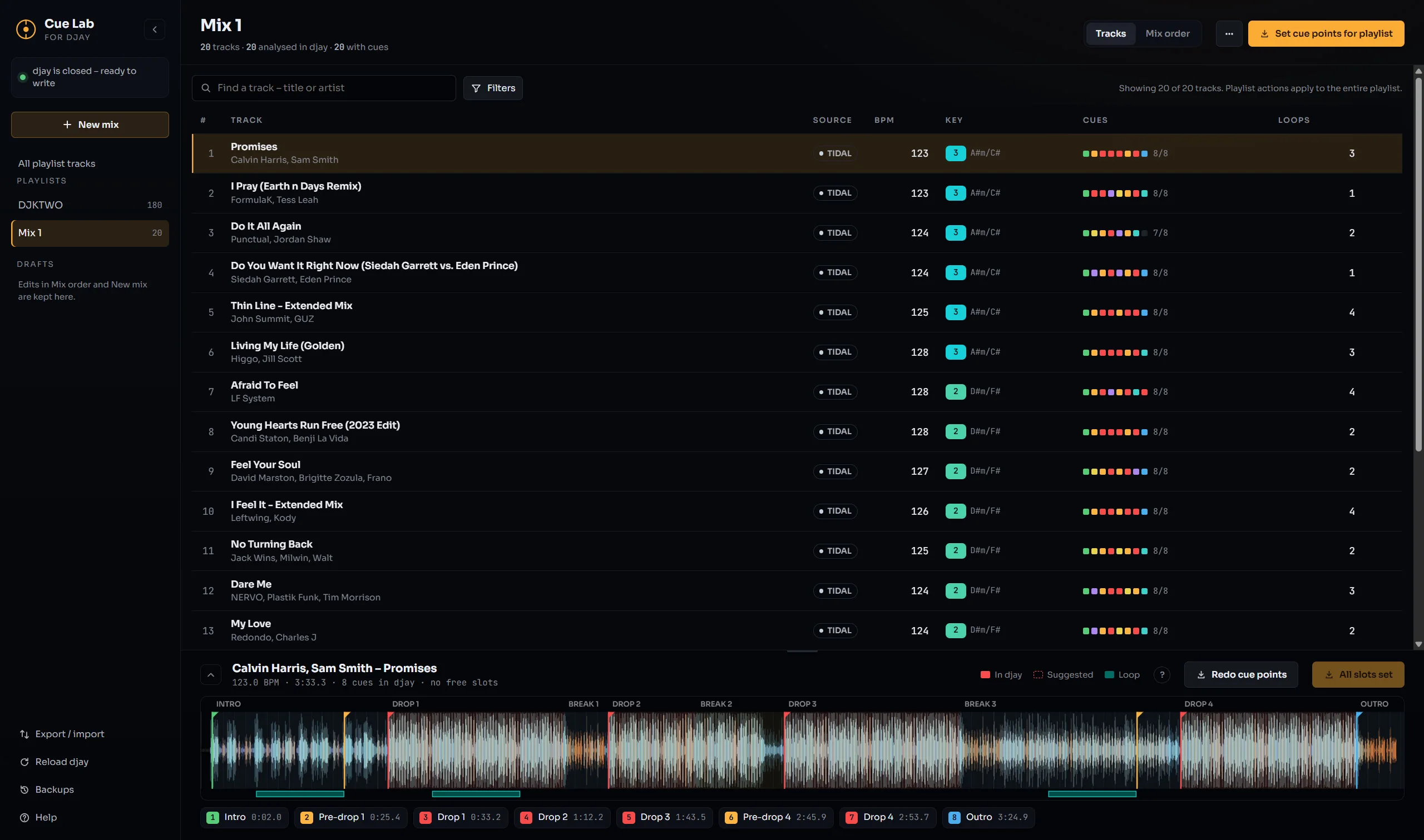
Suggests cue points and loops at the moments that matter, built on djay’s own beat grid, waveform and key.
Proposes an order for a playlist so tempo and key flow from one track into the next.
Writes your choices into the djay library — and copies the whole library first, so any change can be undone.
KTWO-Cue-Engine-Windows.zip and unzip it.KTWO-Cue-Engine-Mac.zip and unzip it.It reads the analysis djay Pro has already made of your tracks — beat grid, waveform and key — and suggests cue points, loops and a mix order for your playlists. You review the suggestions, keep what you like, and KTWO Cue Engine writes them into your djay library so they’re there the next time you open djay.
djay keeps its library in memory and writes it back when it saves or quits, so anything changed while djay is running would be overwritten. That’s why the app only saves when djay is fully closed — quit it completely (not just minimised), wait a few seconds, then save.
Before every save, the whole djay library is copied. Right after a change you can Undo it, and Backups in the sidebar lists earlier copies — Restore puts one back. A restore rolls back everything changed in djay since that copy, including edits you made in djay by hand; your current library is set aside first, so you can switch back.
djay hasn’t analysed those tracks yet, so there’s nothing to build cue points from. Open djay, load the track on a deck once until it shows a BPM, quit djay, then press Reload djay in the app.
No. It runs entirely on your computer and works offline. The only thing that ever leaves your machine is the optional Discogs genre lookup — if you turn it on, it sends a track’s artist and title to Discogs to find its genre. Nothing else is uploaded.
djay Pro on the Mac keeps its analysis in a folder macOS protects. Full Disk Access lets the app read that analysis and save cue points back. Turn it on once in System Settings → Privacy & Security → Full Disk Access, then reopen the app.
Export to djay on an iPad
First public beta — Windows and Mac
KTWO Cue Engine is free beta software, provided “as is”, without any warranty of any kind. It changes your djay library — cue points, loops, playlists and the database behind them — and like any software it can have bugs.
KTWO Cue Engine is free and always will be. If it saves you prep time before a gig, a coffee on Ko-fi helps keep it going.
Support on Ko-fi ↗KTWO Cue Engine is an independent app by DJ KTWO and is not affiliated with, endorsed by or sponsored by Algoriddim. djay and djay Pro are trademarks of Algoriddim GmbH.